5 Ways I Implement Structure to Create More Flexibility in My Business and Support My Brain as an ADHD Entrepreneur
As a business owner whose ADHD & Autism diagnoses both came later in life and after I had started my business, it’s safe to say that I’ve had to do a lot of learning when it comes to understanding how to support my brain as an entrepreneur. This has happened through a lot of trial & error and, honestly, a lot of struggling and being forced to figure out a better way to do things.
The five things I’m sharing below may all seem pretty small or inconsequential but they have truly had the biggest impact on my ability to create a business that allows myself and my brain the flexibility that I need. And something that I’ve come to realize over the past 5 years is that oftentimes, the small changes that you make just to free up more mental space, are the ones that actually have the biggest impact!
Here’s how I’ve added structure in my business:
1. Creating project timelines for each of my services
Now to be clear, these are not timelines where everything is so planned out that if one thing gets delayed, the entiiire timeline is off. But rather, timelines where I’m intentionally giving myself (and my clients) time to move things around if needed. Essentially—my timelines are created with the objective to provide more time than necessary, for everyone involved, that way if we need extra time to get things done, it’s already accounted for (and if we don’t, then the project gets done faster than anticipated!).
What this looks like for me specifically is grouping my tasks into a certain week of the project and having all of my due dates at the end of the week. This allows me to go in and:
have flexibility to push things back a day or two if my brain is struggling to focus at a certain point during the week, without it delaying the project timeline
have the ability to move tasks around to different days of the week depending on what my energy levels are during any given day, or shift to focusing on a different task that’s due that week if my brain is feeling more excited by it than what I originally had scheduled for that day
So while there is an overall structure with things being due at the end of the week & certain tasks being “assigned” to each individual week of the project, within that structure I have the flexibility to move things around and adjust my workload based on how my focus and energy ebbs & flows throughout the week.
Having my projects structured this way also allows me to more easily plan for taking time off because I know what things are supposed to be done during any given week of the project. So for example, if I’m taking a week off in the middle of a client project I can either:
A) Strategically plan to take off on a week where I’m not doing anything, the client is just providing me their feedback
or
B) Work ahead of schedule during the week(s) leading up to my time off so that everything can continue to run smoothly while I’m gone and when I come back
Here’s an example of how I use Notion to map out what my project timelines look like:
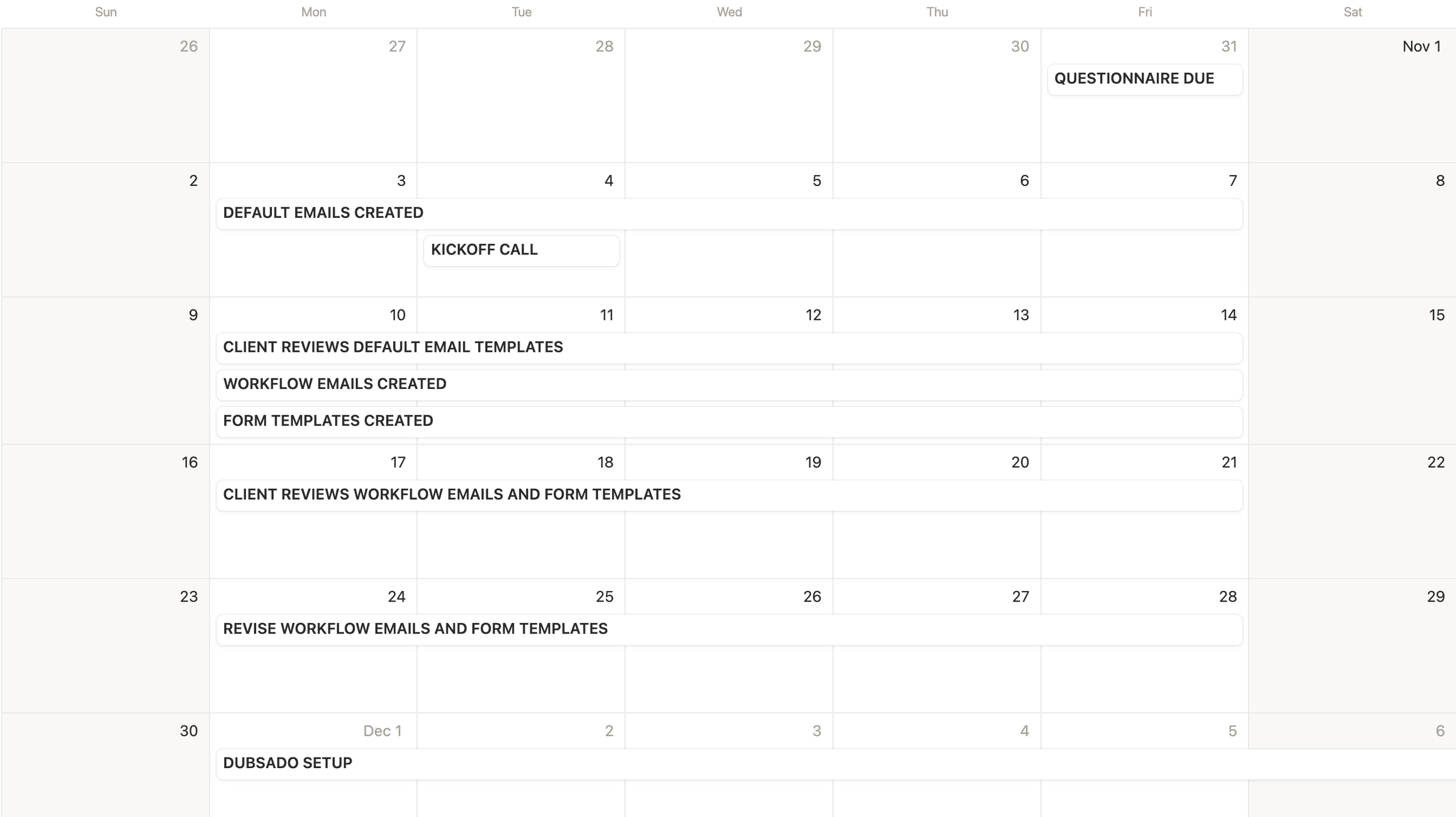

The reason why I love to use Notion for this is because Notion offers the option to turn on dependencies, which allows you to make one thing dependent on the thing before it, and automatically shift & maintain the time between tasks.
This is really helpful for me because when it comes to booking projects, I like to be able to see how a new project will overlap with any ongoing projects I already have. With the dependency feature in Notion, all I have to do is go into my project timeline template and change the date of the Kickoff Call and allll the rest of the task dates will update automatically, based on that new Kickoff Call date.
Then, I can easily preview what a project would look like on any given start date, to better understand when it makes sense to add a new project onto my current workload without putting too many things on my plate at any given time.
2. Having a detailed breakdown of all the tasks that need to be completed for each of my services
This task breakdown is actually what helped me map out my project timelines in the first place because I was able to get realistic about how much work I wanted on my plate per week. Not just per project, but if I was working on more than one project at a time (which I typically always am), how many would I be comfortable with overlapping before I felt overwhelmed by the workload?
Then, I was able to build project timelines based on my desired workload, as opposed to just trying to finish projects as fast as possible. And now I have the ability to better determine what my capacity is for certain types of projects per month, so that I’m not accidentally overbooking myself and then getting burnt out!
If you want to learn more about the process I took myself through in order to map out my project tasks and timelines, check out this blog post where I break it all down for you →
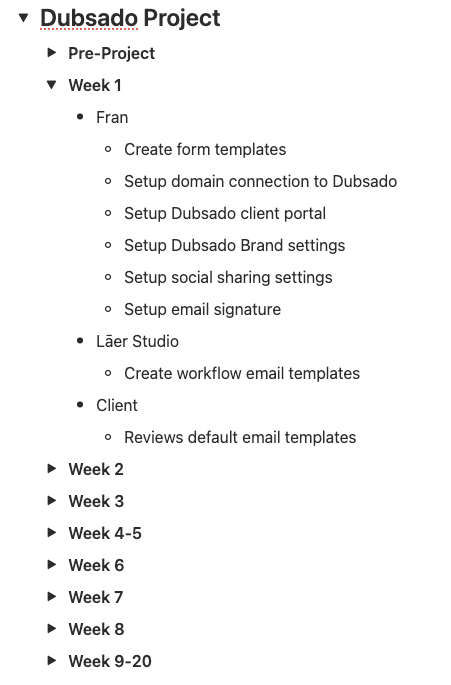
And here’s an example of how I organize these task breakdowns inside of Notion so it’s easy for me to reference:
3. Automating small parts of my business that contribute to more mental clutter
The first two things on this list both allow me to automate parts of my business that take a lot of spoons. Because nothing is a bigger vibe kill than feeling lit up about jumping into client work or creating content for your business and then realizing you actually need to do a ton of admin work instead.
Some of my favorite automations that save me brain power are:
→ sending a welcome email, kickoff call scheduler + questionnaire after a client signs their contract and makes their first payment in Dubsado
→ creating a new project in Notion when a client books in Dubsado (this is done via Zapier)
→ alllll of my project tasks are added into Notion with the click of a button and the due dates are automatically pre-assigned in relation to the project start date
4. Keeping track of my tasks in a project management platform
When I look back on the time in my business where my brain was struggling the most, it was when I didn’t have a project management tool to use for task management and the way I was approaching task management was literally just (trying to) remember everything in my head.
It did notttt work for me because I was trying to remember all the things for every single project and then stressing that I was forgetting things because I knew I struggled with keeping track of stuff. So not only does having a task management tool help me make sure nothing is slipping through the cracks when it comes to my projects, but it also gives me the ability to have more of an intuitive, flowwy approach to my day.
Because I can always easily see what needs to be done during any given day or week, instead of waking up feeling anxious because I think that I have a bunch of things to do OR because I actually have no idea what I’m supposed to be working on.
Here are a few of my favorite ways to display tasks in Notion:
5. Only taking client calls on one day per week
Last, but certainly not least, there is only one day on my calendar per week that is open to client calls (currently, it’s Tuesdays!). This helps keep my energy levels consistent and me be more productive during the rest of the week.
I made this shift because I noticed that:
when I had one call and it was later in the day, my brain could NOT focus on getting anything done until that call was over, meaning that the rest of that day was wasted
I struggled to focus on work when I was constantly switching my attention from client work to calls
my energy levels felt drained when I was having calls all throughout the week
I typically don’t schedule any tasks for myself to work on during my call days so that I can really focus on one thing, but if it’s a day where I happen to not have calls or I only have a short one in the morning, I might use that time to work ahead or just take some time off.
Not having a bunch of calls at random times throughout the week allows me to focus better, have more energy, and get work done faster, which equals more flexibility for how each day looks and more time for non-work activities :)
How I can help you create a structure of your own for your business
Who I Am
If you’re new here: Hi—I’m Fran! Client experience architect, AuDHD entrepreneur, automation enthusiast, and cat mom (to name a few). I believe that your client experience should support YOU, not just your clients, and that one of the keys to creating a business that actually feels good is having backend systems that are built to support your brain and the unique way you work. Wanna learn more about me?
What I Do
I help other neurodivergent or squiggly-brained business owners identify what types of backend systems they need and set them up in a way that works for YOU, using platforms you actually vibe with. Here’s how I do it!
How I Can Help You Create Structure in Your Business
If you need help figuring out project timelines that have built-in flexibility, check out my blog post on that here →
If you’re looking for a tool to use for project and task management, check out my Notion Project + Task Management template for service providers — it’s designed so that there’s multiple ways of viewing the information so that you can find what works best for you and rock with it!
If you’re overwhelmed by all of this and would rather just have someone help you through the whole process (& take most of it off your plate for you) you might like to work together on a Client Experience Revamp!