Custom Notion Workspace: How I Built a System for Kristina’s Brain
If you’ve ever had something in your business that wasn’t working well for you and eventually it got to the point where you simply couldn’t ignore it for any longer…that’s pretty much where Kristina—Brand Designer, DIY Educator, and founder of Gem Creative Co.—was when she reached out to me about this project. (Fun fact: Kristina’s Brand Ed course is actually what helped me create my own branding—the one you’re seeing on this site!)
She had known for a while that she wanted to switch from Milanote to Notion for her task and project management and, over time, this part of her business started to feel heavier and heavier because her system in Milanote wasn’t able to keep up with her needs and business growth. She booked a Custom Notion Workspace project with me, where I built something that was completely tailored to brain, instead of making her feel like she had to work around the constraints of a specific platform.
With her task management in Milanote she wasn’t getting the level of detail or visibility that she truly needed.
Instead she was stuck in a cycle of:
Deleting tasks every week to make room for new ones, with no way of viewing historical data
Copy & pasting tasks from individual project boards over to her weekly board, because there was no connectivity between her project tasks and weekly tasks
Feeling like invisible tasks (like admin work) were consuming unaccounted time
Not knowing what her upcoming workload was going to look like and struggling with overbooking certain weeks
At this point, she felt like she was “holding everything together with band-aids” and she knew it was time for something better.
What she needed was a task management system—built specifically for her brain—that would continue to grow with her business.
So that’s exactly what I created through a Custom Notion Workspace project that included:
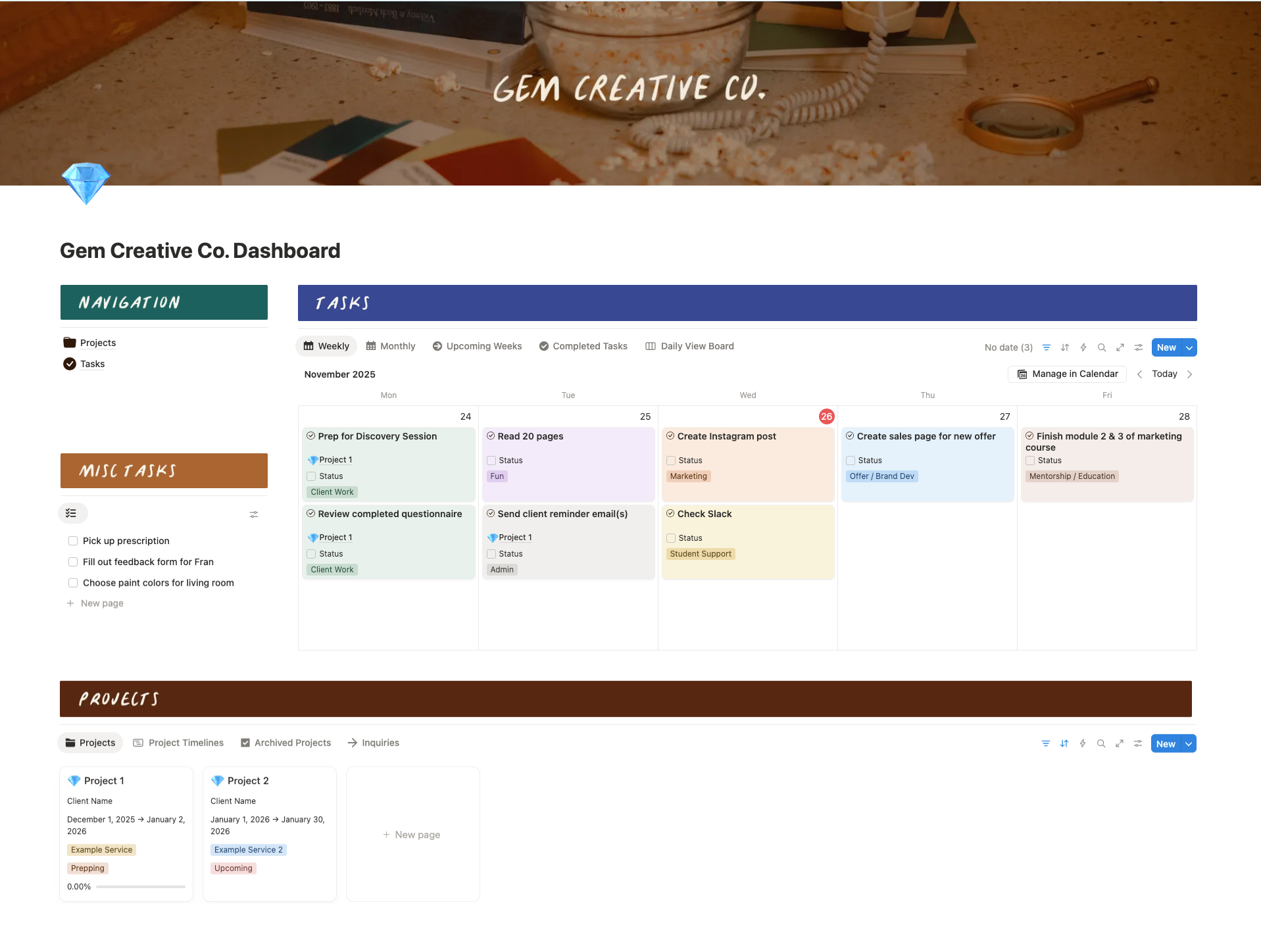
1. A tailored dashboard for tasks and projects
So that every time she opens Notion, all of the most important information is visible to her immediately. It eliminates the time spend wondering “what am I supposed to be working on right now?” or “what projects do I have going on?” by allowing everything to be easily accessible.
2. Multiple task views
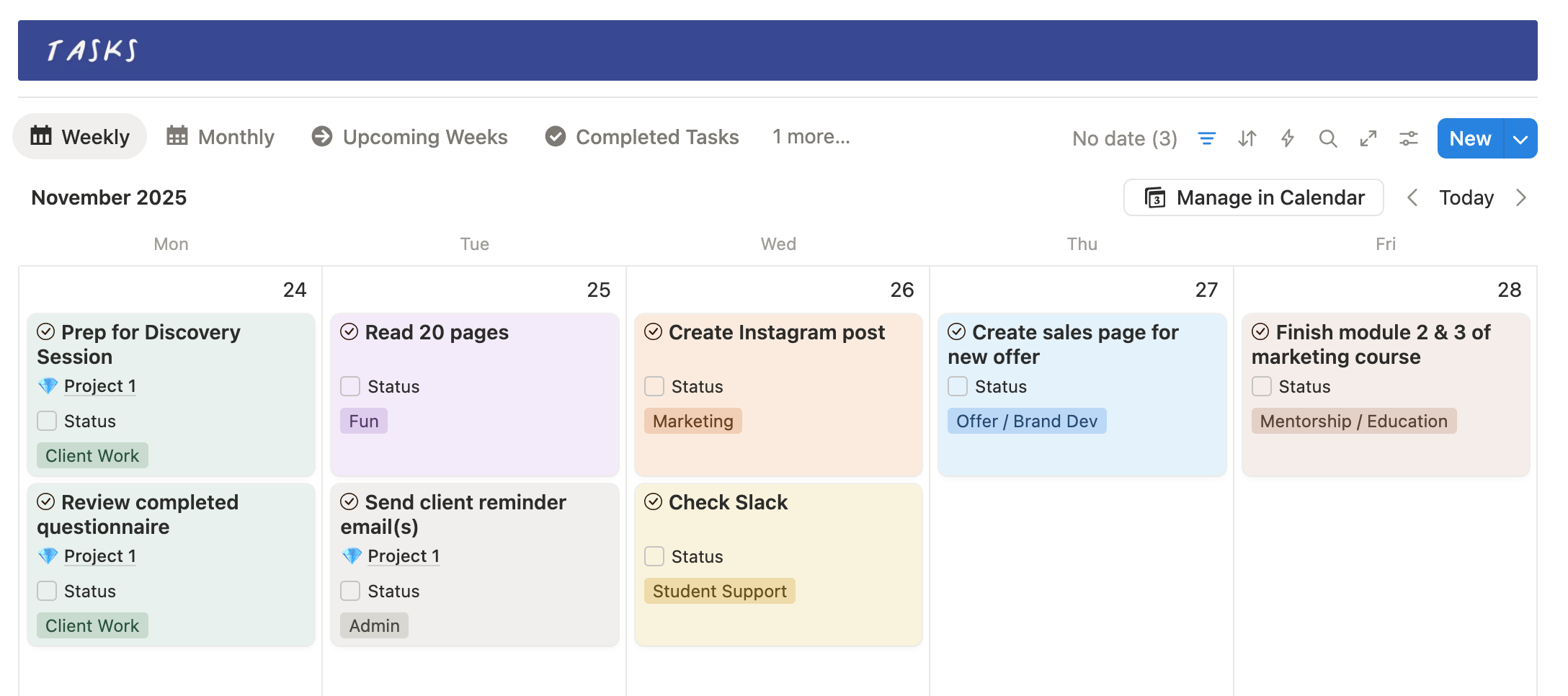
One of my favorite things about Notion is how easy it is to display tasks in a way that makes sense to YOU. Whether that’s a calendar view to look at your upcoming week(s), a board view to see what the status of each task is, or a more “classic” table view for task management—they’re all possible in Notion, and you don’t have to just choose one!
In Kristina’s case, I set up both a weekly and a monthly calendar view for her to have more of a zoomed in view for everyday use, as well as a zoomed out view to easily see what’s coming up next.
3. A view of future capacity
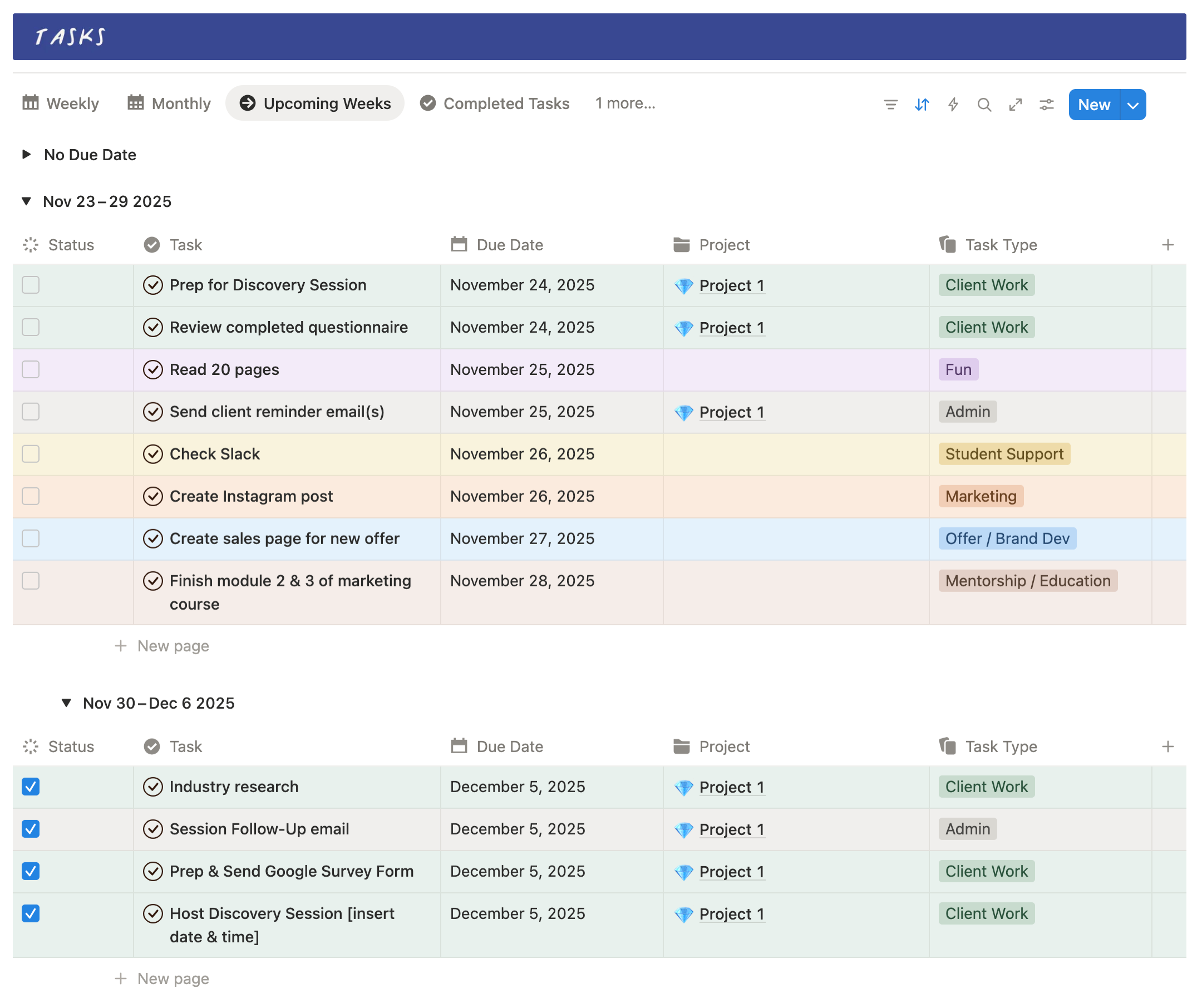
By utilizing the “Group by Date” feature in Notion for this view, Kristina is able to see all of her upcoming tasks grouped together based on the week they’re due and to show the number of estimated work hours for that week based on the tasks included. This makes it easy to determine when she can start a new project because she’s able to actually see what’s coming up on her schedule and know not to add anything else to her plate if a week is already full of demanding tasks.
4. Completed tasks
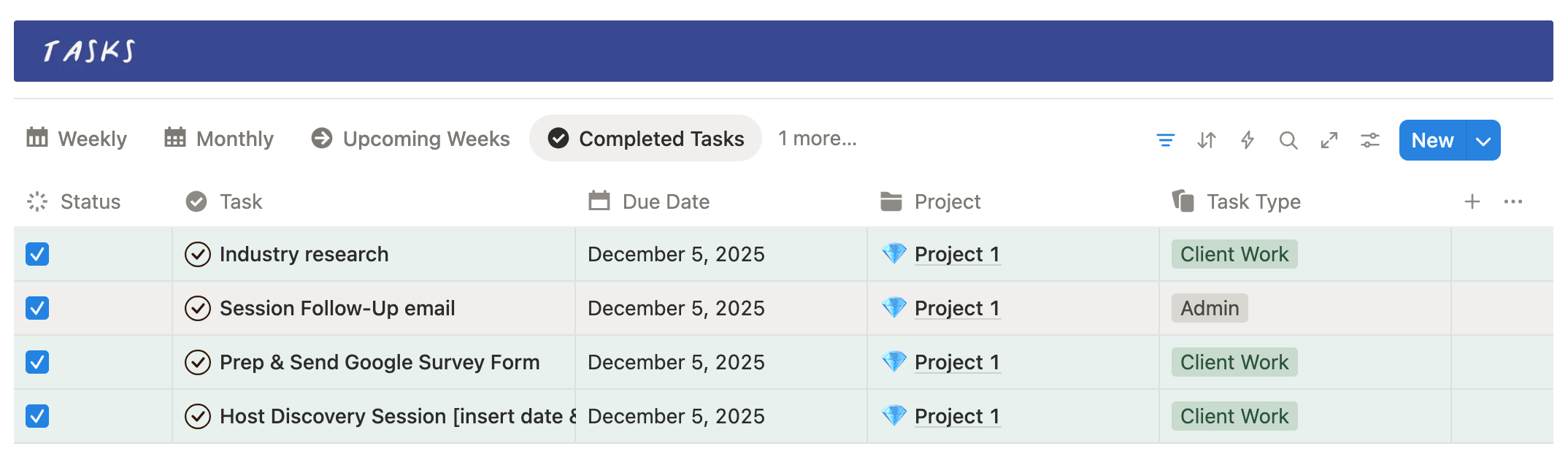
There’s no telling when you might need to refer back to something you completed a week, a month, or even a year ago. With Kristina’s old task management system that wasn’t an option because everything was deleted each week to make room on the board for the current week’s tasks.
In Notion, she has a dedicated view specifically for completed tasks and can also utilize the search feature to find tasks that she’s previously completed if she needs to refer back to them at any point.
5. Individual project templates
One of the things that Kristina liked about her Milanote setup was having separate boards for each client project so she could see all of their tasks in one place and keep track of tasks based on the project phase they fell under. The downside was that there was no connection between individual project boards & her weekly tasks, so she was copy & pasting tasks from each client’s board into her weekly board view every week.
In Notion, we’re still able to achieve that same board view inside of an individual client’s project, where the tasks are grouped by the project phase. But now they also automatically show up in her main tasks view on her dashboard, too, based on the due date assigned to them.
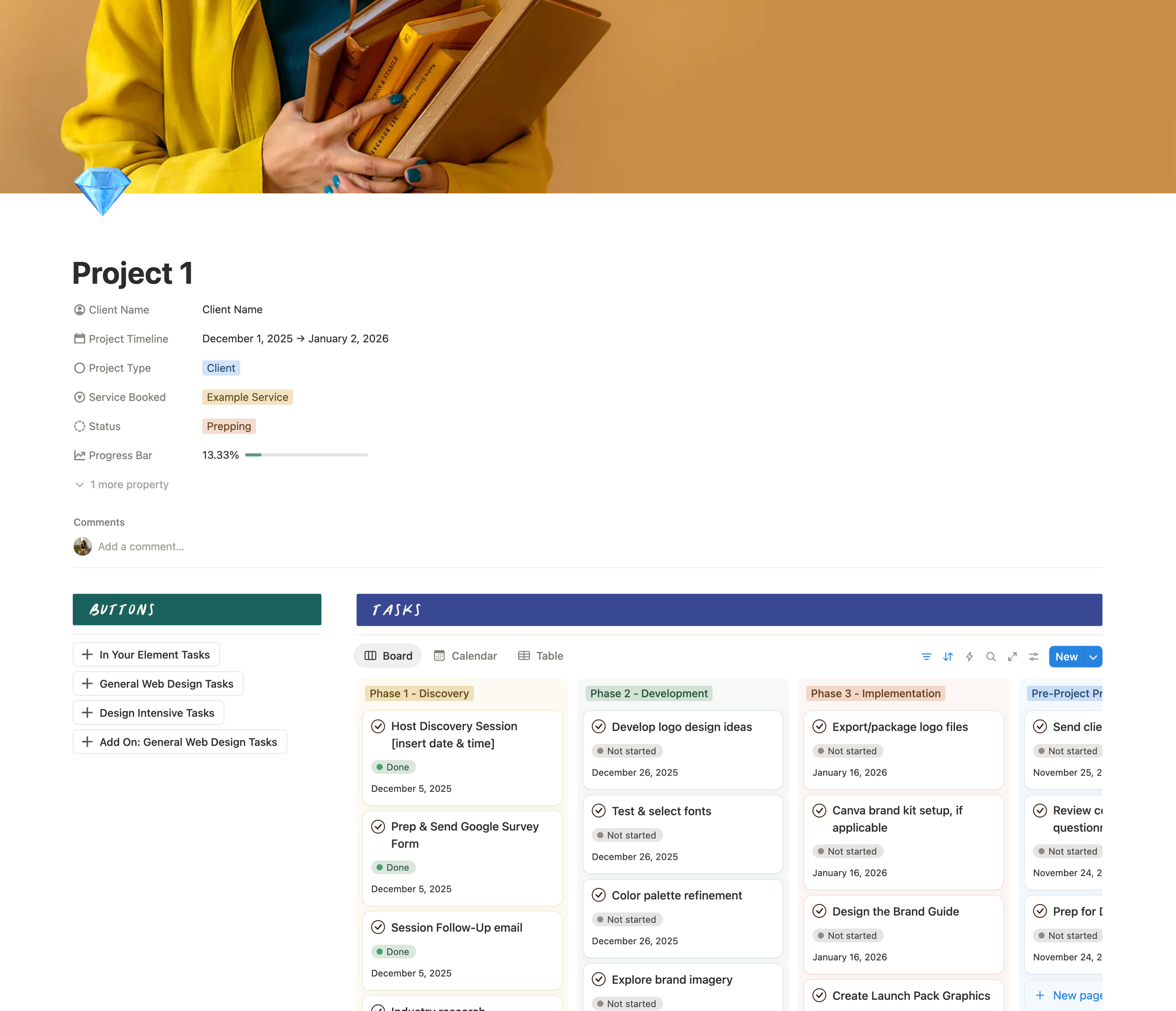
6. Automated task buttons
One of my other favorite things about Notion: buttons! Each button represents a specific services she offers & the tasks that need to be completed for it. When the button is clicked, it adds those tasks to the project, sets their status as “to-do”, assigns them to Kristina, adds them to the correct project phase, and sets their due date.
Because Kristina’s projects follow a weekly schedule where there are certain tasks either herself or the client is responsible for each week, her task buttons automatically set the due date for each task to the Friday of the corresponding week. That way, at the end of one week, Kristina can look ahead to the next week and move tasks to specific days of the week based on when she wants to be working on things.
7. And a few small details that make it work best for her brain.
Like the quick nav section where she can link to important Notion pages that she uses frequently. A miscellaneous tasks section that allows for quick reminders (like paying a bill) to still show up in her completed tasks. And, of course, color-coding all her tasks to align with her color-coding strategy in Toggl.
This custom Notion workspace setup has lead to:
1. Complete visibility over all her tasks
Instead of everything being disjointed and in separate places in Milanote, it’s all connected in Notion making everything easy to see.
In her words: “Now everything’s visible. I can see everything. I can log everything. And things like admin tasks, those were pretty much invisible, but now I can see it all.”
2. Releasing the mental burden
Kristina says “I didn’t realize just how much weight I was putting on myself to carry it all internally. So it was a big realization that I don’t have to hold all of this.”
This is something a lot of my clients express, regardless of whether the project involves Notion, Dubsado, or HoneyBook. More often than not, there is this unconscious mental stress that we experience as business owners when we’re trying to keep track of everything in our heads. It’s not until after we have a system to put those things into that we’re able to understand truly how much background stress that causes us.
3. A clear view of future capacity
Being able to see all the tasks for an entire project as soon as a button is clicked is a game-changer, especially when you’re someone who books projects out in advance and needs to consider what your schedule is going to look like 1-2 months or more down the line.
Like how “it’s saved a lot of future time spent trying to place tasks and events, knowing that I can look ahead and already have that week figured out.”
4. Searchable project history
Kristina shares, “If I have to go back and revisit a task from two months ago that I did and I can’t find a link or I need something that was associated with it, it’s not gone in the wind anymore. I can search it and then whatever files or whatever is inside that page is there.”
The result? A system that feels like a sigh of relief.
“It’s now like a sigh of relief and a source of satisfaction. Whereas before, it was a unrealized frustrating part of my business.” That’s what it feels like when you have a system that’s built FOR you and tailored to exactly what you need.
So many business owners, myself included at one point, try to force ourselves to use certain tools or platforms because someone else recommends them or because they used to work for us at a different stage of our business. But it’s important to truly consider what you need in the current moment to feel supported in your day-to-day business operations.
That’s why having a Custom Notion Workspace can be so impactful; because it allows you to think and stress less about knowing what you have to do, when you have to do it, and what’s coming up next, and instead allows you to focus on the things you actually want to be spending your time on.
Wondering if a Custom Notion Workspace is right for you?
If you’re reading this post and you can relate to a lot of what Kristina was experiencing before our project, that’s definitely a sign that your project and task management system might not be working for you. Here’s what it looks like to work together on a Notion project:
You fill out my contact form and tell me about your current situation and what you’re struggling with
We hop on a quick call, chat via email, or via DMs (your pick!) so I can learn more about your business and answer any questions you have
If it feels like a good fit, I put together a custom project proposal based on what your needs are. The average investment for this project is around $1,700 with payment plan options starting at $600/month. This varies depending on the number of pages needed in your setup, whether you have existing content that would need to be migrated over, and the length of support period you’re desiring.
If you move forward with the project, you’ll sign a contract, make your first payment, and receive an onboarding questionnaire. This is where I’m able to learn more about your brain’s preferences and what type of solutions will work best for you!
The Notion build itself takes 2-4 weeks, depending on feedback speed, and includes 2 phases (initial build and revisions & brand implementation).
After the build is complete, I provide instructions for getting it moved over to your Notion account and set up any automations or migrate existing content over (if applicable).
We move into your support period (typically 30 or 60 days) which is where you’re able to start using the new workspace, ask me any questions you have, and even get things adjusted if they’re not fully working for you in practice.
The goal with my approach is that, by the time we finish working together, you have a Notion workspace that feels like it was built for you and truly works for your brain, too. That’s why the support period is so important, because it’s essentially like a test drive for your Notion workspace, so you can see if anything isn’t 100% to your liking, and we can adjust before we officially wrap things up!
Interested in chatting about a project? Head to my contact form to get in touch! Prefer more of a DIY approach? Check out my Notion Project + Task Management template!